Workflows
A Better Cycles Render Test: Compare Quality Before You Commit
Build a repeatable Blender Cycles test for noise, denoising and fine detail. Use representative crops and a simple comparison log before rendering the whole shot.
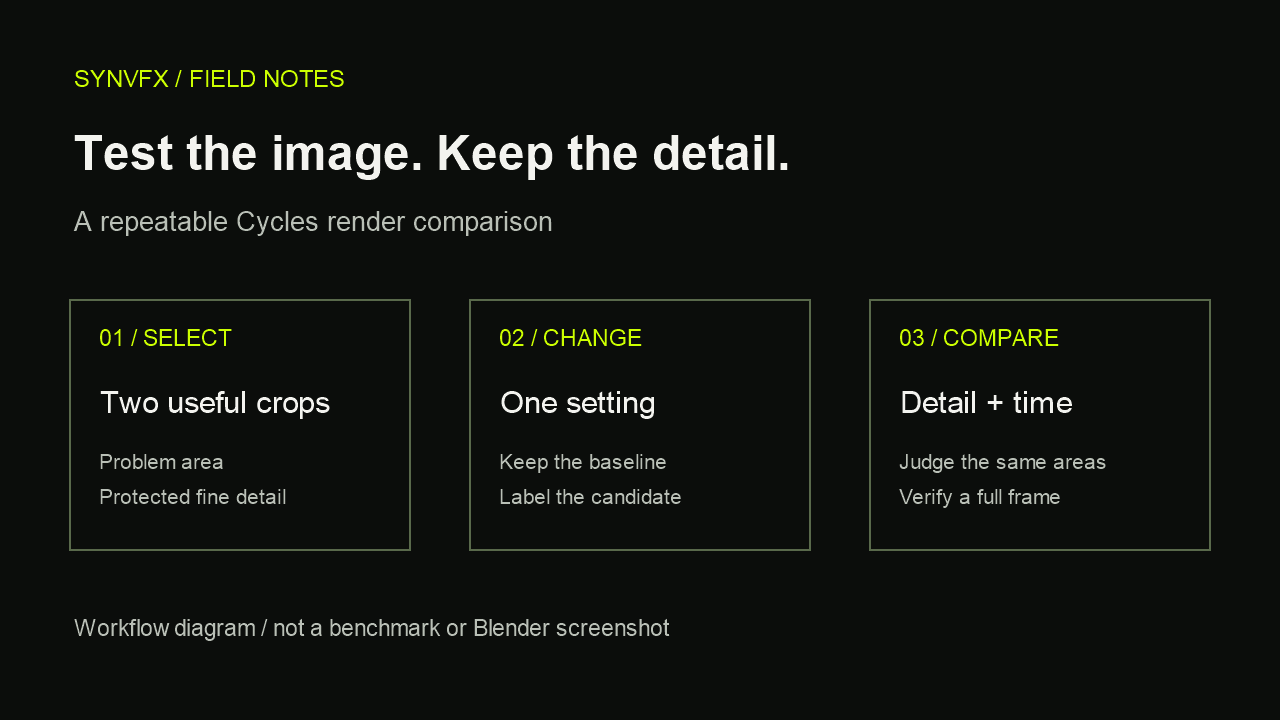
A render test should answer a decision: is this change worth using on the shot? A tiny preview that looks clean can hide a damaged texture, and a detailed crop can miss a noisy dark corner. The useful test is a small, repeatable comparison that represents the image you need to deliver.
This guide focuses on an artist-controlled testing process for Blender Cycles. It does not prescribe a universal sample count or promise a particular speedup. The best settings depend on the scene, the intended image and the machine doing the work.
1. Choose one question for the test
Write down the problem in visible terms: grain in a dark wall, loss of fabric detail after denoising, or an iteration render that takes longer than your available review window. Avoid testing “better settings” as a single goal. You need to know which result would count as an improvement.
Decide whether you are testing image quality or investigating an earlier bottleneck. If Blender spends most of the wait preparing the scene or runs out of memory before sampling, a sampling comparison will not explain the whole delay.
Diagnose which part of your Blender scene is slow →
2. Pick crops that can disagree with each other
Choose at least two areas from a representative frame. One should expose the problem you want to solve; another should protect detail you cannot afford to lose. For a product shot, that might mean a dark reflection and a small printed label. For an environment, it might mean an indirect-lit corner and fine foliage.
- Use the same camera and frame for both versions.
- Keep output resolution and resolution percentage fixed. A crop should represent the same final-image pixel scale.
- Record the crop bounds and reuse them for each comparison.
- Keep lighting, materials, compositing and color management unchanged while testing a render setting.
Crop results are a screening tool. Their timings do not directly predict full-frame time: scene preparation, denoising, compositing and the distribution of difficult pixels can change the balance. Use them to discard poor candidates before a representative full-frame check.
3. Save a baseline you can reproduce
Render the selected areas with your current settings and save the results with clear names. Record Blender version, render device, frame, output size, crop, relevant sampling settings and whether denoising was enabled. You do not need a large spreadsheet; a short text note beside the renders is enough.
| Version | Changed setting | Time | Quality observation |
|---|---|---|---|
| A — baseline | None | Record actual elapsed time | Describe noise and protected detail |
| B — candidate | One setting only | Record actual elapsed time | Compare the same areas |
| C — verification | Chosen candidate, full frame | Measure separately | Check complete image and delivery needs |
If you compare elapsed times, keep the machine conditions as similar as practical. A background export, another GPU task or a different render device makes the comparison less useful. If one result is surprising, repeat it before treating it as evidence.
4. Separate sampling decisions from denoising decisions
Cycles adaptive sampling spends less work in areas that have reached its noise criterion. Noise Threshold and the sample limit therefore have different roles. Denoising is a separate image-cleanup step; it does not make every low-sample result suitable for delivery. Blender documents these controls in the Sampling section of the manual.
Blender manual: Cycles sampling and denoising (4.2 LTS reference) →
For a threshold experiment, hold the sample limit and denoising configuration fixed. For a denoising experiment, keep the sampling settings fixed. This gives each comparison a specific meaning. Control names and available denoisers can vary by Blender version and hardware, so check the manual for your installed release.
First compare the problem area. Then inspect the protected detail at a consistent image scale: thin edges, small text, subtle texture and reflection transitions. Finally judge the result at its intended presentation size. A difference that is visible only under extreme magnification may matter less than one that distracts in the actual shot.
5. Make a decision before stacking changes
Write a short verdict for each candidate: keep, reject or investigate. “Faster, but the label loses legibility” is a useful rejection. “Cleaner shadows with no visible loss in the protected crop” is a candidate worth verifying, not proof that every frame will work.
Do not combine several untested changes and then attribute the outcome to your favorite one. If you want to test a combination, establish its components first and label the combined version separately. That small amount of bookkeeping makes it much easier to restore quality when a late review catches a problem.
6. Verify beyond the crop
Render a complete representative frame with the chosen candidate. Check regions outside your original samples, the final compositing result and the exported file. A local success can fail elsewhere in the image.
For animation, also test a short representative sequence containing motion or changing reflections. Review it at the intended playback speed. A sequence can look unstable even when individual still frames seem acceptable; do not approve an animation setting solely from one polished frame.
- Check the intended output size and color-management configuration.
- Review dark regions, bright highlights and protected fine detail.
- Inspect frames where motion or lighting changes the difficulty of the shot.
- Record the chosen settings and keep the baseline until delivery is approved.
Where scene-review tools fit
A scene-review tool can help you decide which question to investigate. It cannot replace the image comparison that proves whether a setting works for your shot. If you use SYNAE, treat a local finding as a prompt for a controlled experiment rather than an automatic quality verdict.
Build a reversible scene-optimization workflow →
A small habit that prevents expensive guesses
Keep one baseline, two representative areas and one question. Compare both quality and elapsed time, then verify the winner on a complete frame or short sequence. The goal is not the lowest number in a settings panel. It is a result you can explain, repeat and trust for the next stage of the work.